
This sample export is image-only. It keeps the page appearance but loses the original searchable text layer; check what your recipient needs.
How to Redact a PDF on iPhone Offline
Open a local PDF on iPhone, review detected details, apply draft redactions and export a separate copy. Follow the tested buttons and download the fictional example.
Intent: Remove an email or phone number from a PDF before sending it to someone who does not need those details.
Quick answer
In OfflinePDF, choose a PDF stored on your iPhone, open the review workspace, apply the details you want to remove, then choose Hard Redaction and Create Safe Copy. Check that new file before you share it. Download cloud-hosted files before you need to work offline.
- Keep the original. Draft marks in the editor are not the final copy.
- Use Hard Redaction for this workflow; Standard Copy does not burn in draft redactions.
- Review the export and its check results. Metadata cleanup is a separate decision.
In this guide
Fit check
Use this workflow when
- You have a PDF on your iPhone and need to remove specific details before sharing.
- You can review each proposed redaction and inspect a separate exported copy.
Not ideal when
- Your recipient requires searchable text, accessible text or editable form fields that this image-based example does not preserve.
- You need hidden-data inspection beyond the checks available in the app.
Decision rule: If a removed detail remains visible, searchable or copyable in the export, stop and review a new copy before sending it.
Step-by-step workflow
- Prepare a local copy. Open the PDF in Files before you lose connectivity, and keep the original separate. Install the app and check its current export allowance or Pro access before relying on it away from a connection.
- In OfflinePDF, tap Choose a PDF and select the file in the system picker. Tap Open & Review. For the searchable sample below, local rules found the email and phone without a model download.
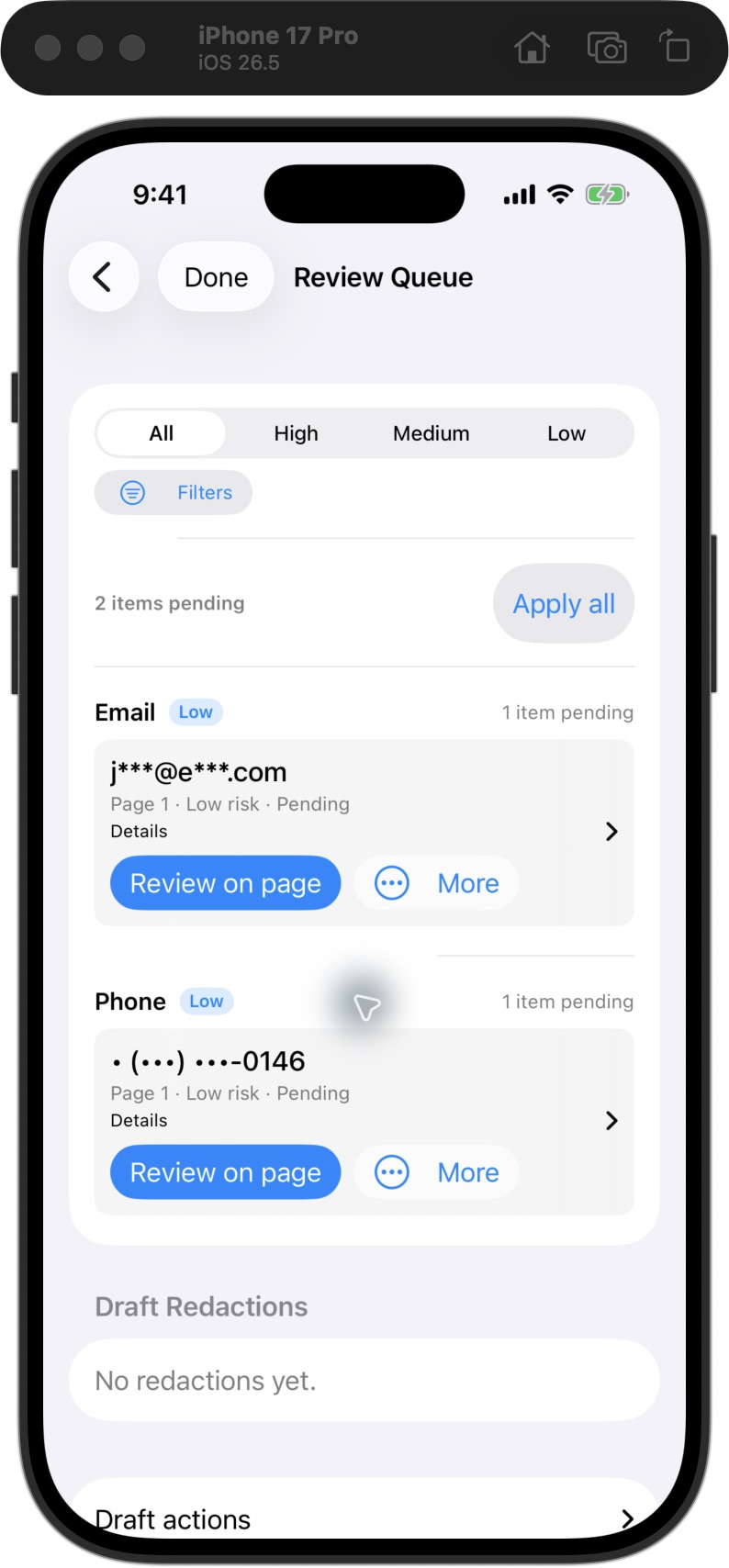
- Open Review Queue. Use Review on page to inspect each finding in context. Open its More actions menu and choose Apply Draft Redaction for a detail you want to remove. Review the whole page too; automatic suggestions can miss details.
- Confirm the intended items appear under Draft Redactions, then tap Done to return to the page. In this example, the email and phone became two draft redactions. The fictional name and work summary were kept.
- Tap the export icon at the top right of the redaction workspace. Choose Hard Redaction and enable Verify Removal. Review the Before export checklist, including filename and hidden-data findings. Resolve sensitive hidden data or use a tool that can inspect it; do not accept a warning just to finish.
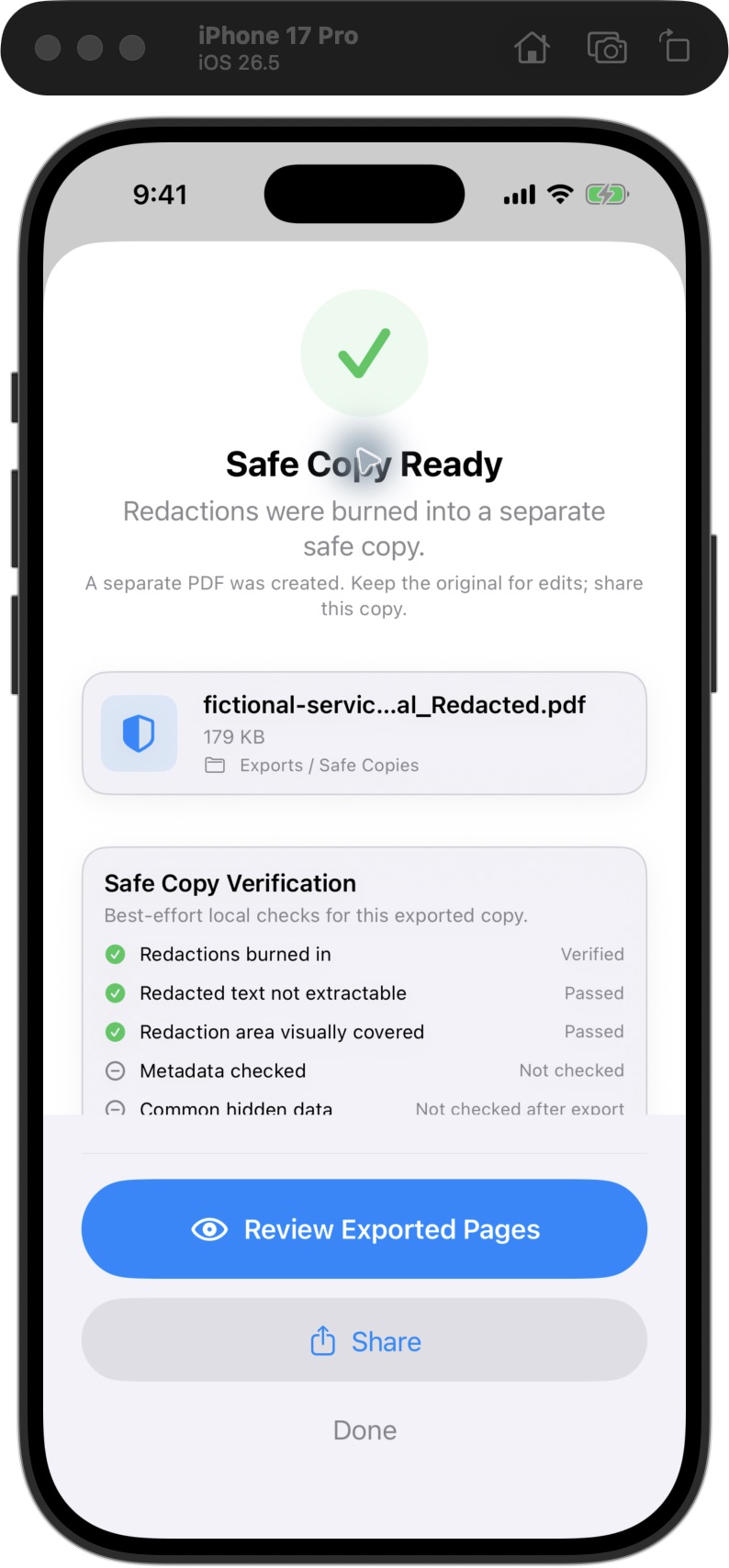
- Tap Create Safe Copy when the plan matches your intended output. Check the result labels individually, then tap Review Exported Pages. The example passed text and visual checks, but metadata was not checked. Keep the new copy apart from the original and run the final-file checks before sharing.
Audience: Professionals handling sensitive PDFs · Difficulty: intermediate
Example and checks
What we checked
Checked · iPhone 17 Pro simulator · iOS 26.5 · OfflinePDF 1.6.4/build 30 · local Debug build
Selected the fictional PDF through the system picker, applied email and phone draft redactions, chose Hard Redaction with Verify Removal, created a separate copy and reopened its pages. The App reported text and visual checks passed; two independent PDF text extractors returned no text from this image-only output.
Limits of this check
- One fictional, searchable, one-page PDF. Scanned inputs, physical iPhone Airplane Mode and the App Store install were not tested.
- The export is image-only; the original searchable text layer was not preserved. No universal recovery test was performed.
- Metadata cleanup was not selected. Only this fictional sample's synthetic warning was accepted; creator and date metadata remain. No purchase or restore was tested.
Common mistakes
- Using Standard Copy after drawing draft redactions; this mode leaves them unburned.
- Treating the automatic findings as a complete list of private information.
- Reading a passed text check as proof that metadata, attachments or every other hidden element was checked.
- Selecting the original in an attachment or upload picker instead of the exported copy.
Tradeoffs
Working on-device still requires preparation: a cloud-only input needs downloading, and installation or a purchase can require a connection.
The App checks selected conditions. Inspect every page and follow up on anything marked Not checked before deciding what to share.
Recommended app for this workflow
OfflinePDF provides the Choose a PDF → review → separate-copy export workflow shown here. Try the fictional file first and check the current free and Pro limits in the app.
FAQ
Can I redact a PDF without an internet connection?
This workflow uses a local input and on-device review and export. Download any cloud-only file and prepare the app first. The example below was run in an iPhone simulator; a physical iPhone in Airplane Mode was not tested.
Why did my black boxes not remove the underlying text?
Draft redactions are editable marks. In this workflow, choose Hard Redaction to create a separate copy with those marks applied. Standard Copy does not burn them in. Check the exported file rather than judging the editor preview.
Do I need to run OCR on the sample?
No. The sample original already has searchable text. Scanned PDFs may need OCR to help locate words, but recognized text can be incomplete or wrong. Inspect the visible page and the covered area as well.
Can I complete the example for free?
The local test configuration allowed a safe export, and one was used for this example. Your current allowance and Pro requirements are shown in the app; this is not a promise of unlimited free exports.
Were metadata and hidden information removed in this example?
No. Only the fictional email and phone were selected for redaction. The synthetic metadata warning was deliberately accepted for the demonstration. Metadata and common hidden-data checks were not run after export; creator and date fields remain.